GPU cloud pricing comparison usually starts in the wrong spreadsheet.
A team needs capacity for AI inference, model evaluation, video transcoding, or a burst of customer workloads. Someone opens three provider pages, copies a few GPU hourly rates, sorts by lowest number, and calls it procurement.
Then production happens. Jobs wait in queues. Spot instances disappear. A region has the right GPU but the wrong storage path. Video outputs need to move across networks. Inference latency is fine in testing and unstable under mixed batch traffic.
Teams think the problem is finding the cheapest GPU. The real problem is designing a compute workflow where price, availability, failure handling, settlement, and output verification are all part of the architecture. That changes the conversation.
Table of contents
- What a GPU cloud pricing comparison is really measuring
- Build a cost model before comparing providers
- Compare GPU supply models not just brands
- The hidden costs in GPU cloud pricing comparison
- AI inference pricing what works and what fails
- FFmpeg transcoding and video jobs have different math
- Operational controls that change the bill
- A practical GPU pricing comparison workflow
- Failure modes where cheap GPUs become expensive
- Product fit c0mpute.com and decentralized GPU workflows
- Closing the gpu cloud pricing comparison loop
What a GPU cloud pricing comparison is really measuring
A useful way to think about it is this: you are not buying GPUs. You are buying completed outputs under constraints.
For AI teams, the output may be tokens, embeddings, images, model evaluations, or fine-tuning checkpoints. For video teams, it may be renditions, thumbnails, HLS segments, or archive transcodes. For web3 builders, it may be verified compute attached to an identity, payment, or marketplace reputation event.
That means the practical question is not only which provider publishes the lowest hourly price. The practical question is which system produces the required output at the lowest reliable total cost.
The unit price is only the first variable
GPU hourly price matters. It just does not carry the whole decision.
A lower $/GPU-hour can lose if the queue is unreliable, the data path is expensive, jobs fail without useful logs, or your team spends engineering time rebuilding missing primitives. The mistake teams make is treating listed GPU rate as the same thing as unit economics.
For most production workloads, total cost includes:
- GPU runtime
- CPU preprocessing and postprocessing
- storage reads and writes
- network transfer
- queue delay and idle allocation
- retry cost
- orchestration overhead
- monitoring and support time
- payment and reconciliation overhead if capacity is marketplace-based
Practical rule: compare cost per completed output, not cost per advertised GPU-hour.
A GPU cloud pricing comparison should end with a unit like cost per 1,000 inferences, cost per video hour transcoded, cost per batch completed, or cost per verified job. If it only ends with an hourly rate, it is unfinished.
The workload changes the price
The same GPU can be cheap for one workload and expensive for another.
Batch inference tolerates queues. Interactive inference does not. Offline FFmpeg transcoding can retry a failed segment. Live streaming cannot casually lose state. Model evaluation can use heterogeneous supply if the outputs are deterministic enough to validate. Training jobs with tightly coupled multi-GPU communication may need colocated high-bandwidth infrastructure.
This is why generic ranking tables are usually weak. They hide the workload. A developer building a CLI-first transcoding pipeline and a team running low-latency LLM endpoints are not buying the same product, even if both type GPU into a procurement doc.
Related reading from our network: teams thinking about cloud-hosted AI visibility face a similar architecture problem in Google Compute Engine and AEO crawler visibility, where the hosting choice is only part of the workflow.
Build a cost model before comparing providers
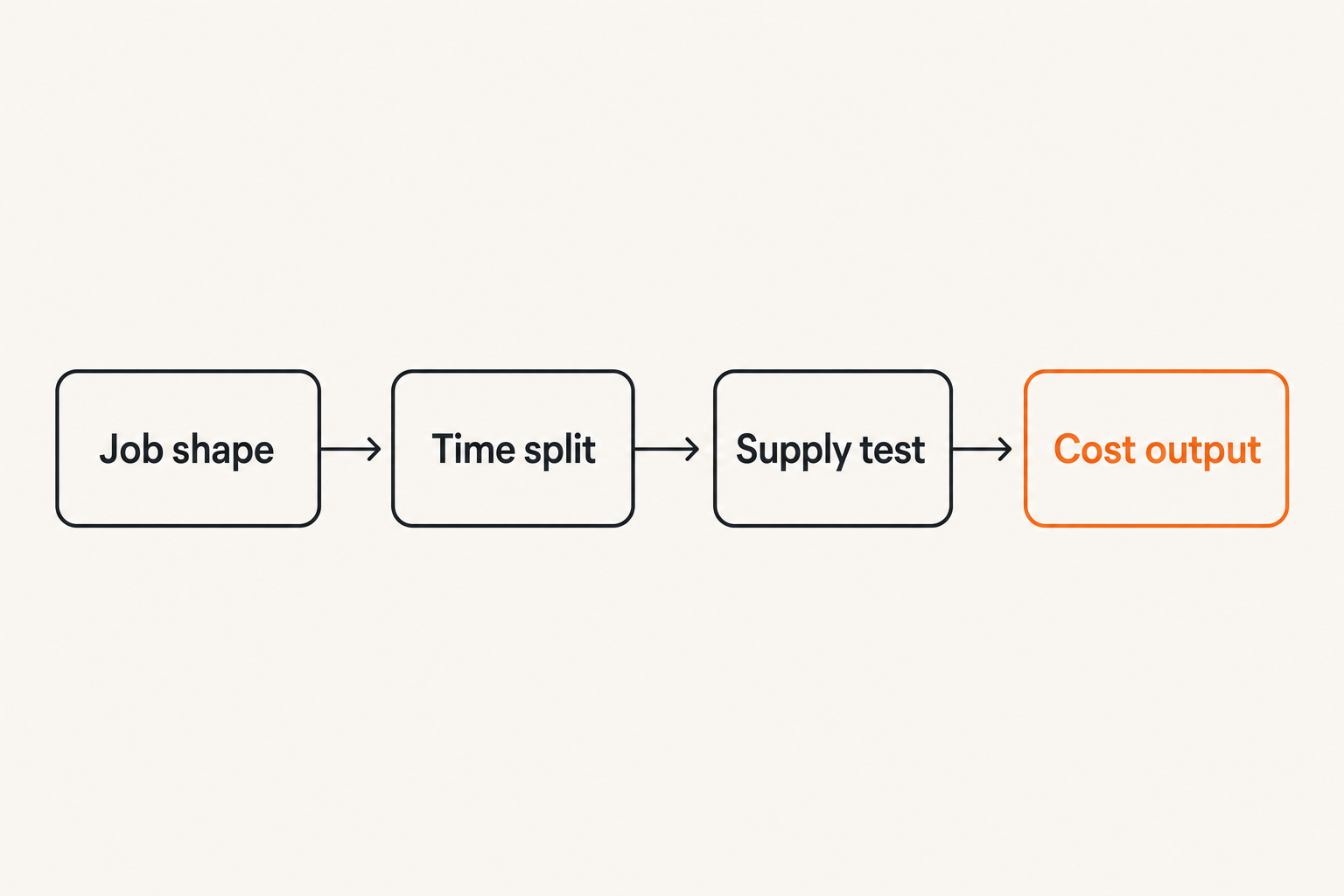
A pricing comparison without a cost model rewards whatever number is easiest to copy. That is dangerous because providers expose prices differently. Some make accelerator cost obvious but bury network and storage details. Some look expensive on demand but predictable under reservations. Some marketplace options look cheap but require stronger validation and routing logic.
The model does not need to be fancy. It needs to represent the job.
Start with job shape
Before looking at providers, write down the shape of the workload:
- input size
- output size
- average runtime
- acceptable queue delay
- failure tolerance
- retry strategy
- required GPU class or memory
- concurrency target
- data locality requirements
- validation method
For inference, job shape may include model size, context length, batch size, tokens per second target, and latency budget. For transcoding, it may include codec, resolution ladder, source duration, segment size, and whether outputs must be produced in order.
A simple job model might look like this:
workload: ffmpeg-transcode
input_minutes: 60
outputs:
  - 1080p-h264
  - 720p-h264
  - 480p-h264
gpu_required: optional
max_queue_delay_minutes: 20
retry_policy: segment-level
validation:
  - output-duration
  - codec-probe
  - checksum
cost_unit: completed-video-hour
That kind of model changes the comparison. You are no longer asking who has the cheapest GPU. You are asking which infrastructure path can execute this job shape with the fewest wasted steps.
Separate compute time from system time
Compute time is the period where the GPU is doing useful work. System time is everything around it: pulling inputs, warming containers, loading models, waiting for a worker, uploading outputs, retrying failures, and writing job state.
In production, system time is where many pricing surprises live.
For example, a model server that takes several minutes to load weights may be fine for long-running inference workers but painful for short jobs. A transcoding worker that repeatedly downloads large source files over a slow path can erase the benefit of cheap GPU capacity. A marketplace worker that finishes the compute but fails output validation is not cheap; it is unfinished work.
Practical rule: if you cannot measure queue time, setup time, runtime, upload time, and retry time separately, you cannot explain your GPU bill.
This is especially important for decentralized compute marketplaces because routing and verification are part of the product architecture. The network can expose useful capacity, but the builder still needs job state, reputation, and validation logic.
Compare GPU supply models not just brands
The cloud market is not one thing. A useful GPU cloud pricing comparison compares supply models.
A traditional provider may offer on-demand, committed, and interruptible capacity. A GPU specialist may offer better availability for specific cards. A decentralized compute network may expose distributed supply with different trust and settlement assumptions. None of these is automatically best. Each changes the operating model.
On demand reserved spot and marketplace capacity
Here is the practical breakdown:
| Supply model | What works | What breaks in practice | Best fit |
|---|---|---|---|
| On demand cloud GPUs | Simple procurement, predictable APIs, fast start when available | High baseline cost, quota limits, regional shortages | Production services with steady demand |
| Reserved or committed GPUs | Lower effective rate for stable usage | Lock-in, bad fit for spiky jobs, capacity planning risk | Known long-running workloads |
| Spot or interruptible GPUs | Cheap burst capacity when available | Evictions, retries, checkpointing complexity | Fault-tolerant batch jobs |
| GPU specialist clouds | Better access to selected accelerators | Smaller ecosystem, varying operational maturity | AI teams needing specific GPU classes |
| Decentralized compute marketplaces | Distributed supply, flexible routing, native marketplace economics | Requires validation, reputation, and job orchestration discipline | Batch AI, transcode, experiments, web3-native workflows |
The mistake teams make is mixing these categories into one ranked list. A spot GPU and a reserved GPU are different products. A decentralized worker and a hyperscaler instance are different trust models. If the table does not show the supply model, it hides the most important tradeoff.
For a broader builder-level view of centralized, edge, and decentralized infrastructure tradeoffs, see our cloud computing companies architecture guide.
Where decentralized compute fits
Decentralized compute is not a magic discount button. It is a different market structure.
It tends to make sense when jobs can be described, routed, executed, validated, and settled without needing a single vertically integrated cloud account to own every step. That is why batch AI inference, media processing, rendering-like jobs, and CLI-driven developer workflows are natural candidates.
What breaks in practice is vague work. If the job spec is ambiguous, output validation is weak, and payment state is disconnected from execution state, the marketplace becomes operationally noisy. Cheap capacity cannot compensate for unclear job contracts.
Practical rule: decentralized GPU pricing only works when the job can be packaged, measured, validated, and paid for as a discrete unit.
That is a workflow requirement, not a philosophical one.
The hidden costs in GPU cloud pricing comparison
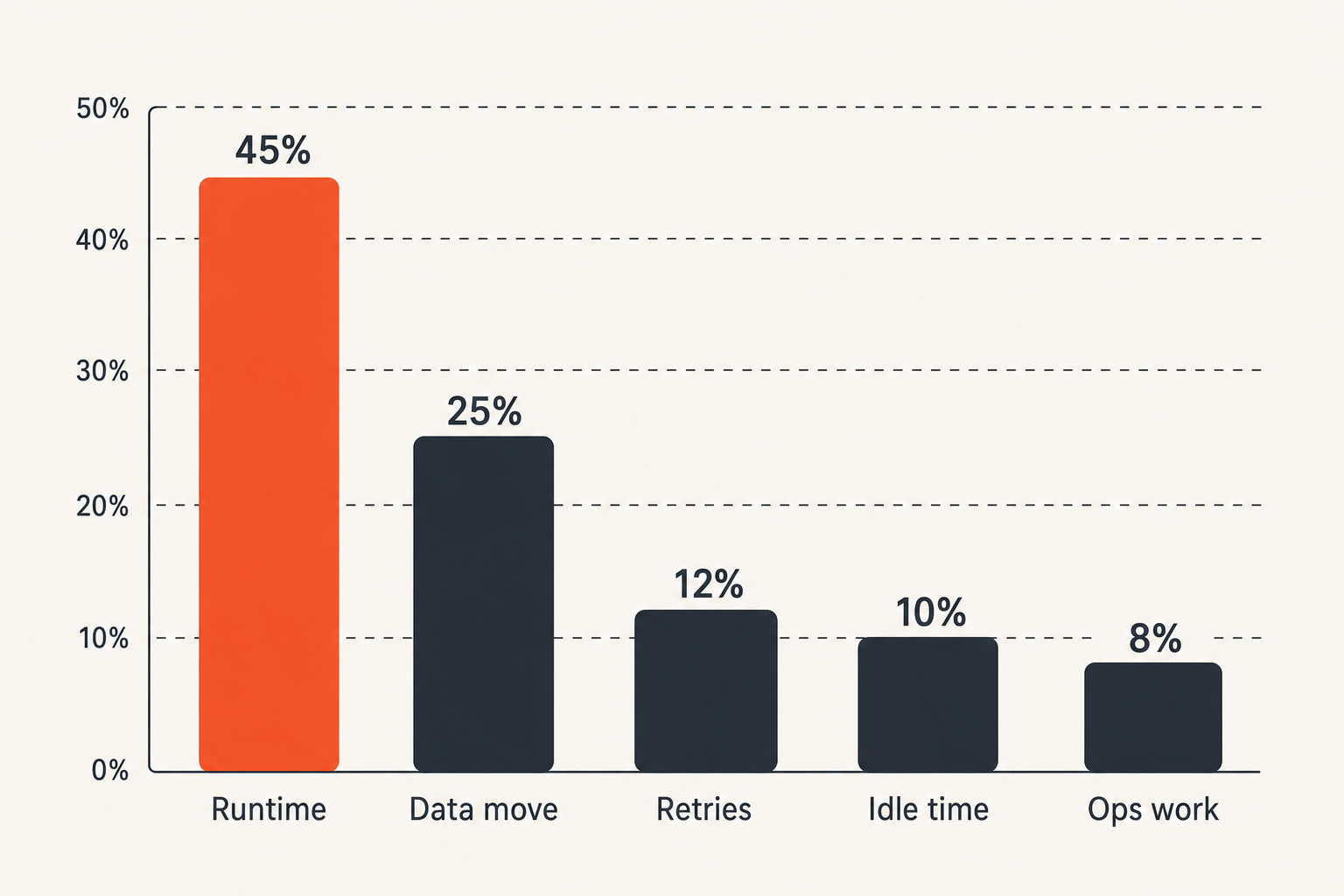
The hidden costs are not exotic. They are the normal parts of production that pricing pages do not summarize cleanly.
The common pattern is simple: a team optimizes for GPU runtime, then discovers that the bill is driven by everything around the GPU.
Data movement and storage
Data movement matters for AI and video in different ways.
AI inference may have small requests but large model artifacts. Fine-tuning and evaluation may move datasets, checkpoints, logs, and outputs. Video workflows often move large source files and multiple renditions. If the worker is far from the storage path, the job may spend too much time pulling and pushing bytes.
A cheap worker in the wrong place can become expensive because:
- input download time increases billed runtime
- cross-region transfer adds cost
- output upload delays job completion
- duplicated storage accumulates silently
- cache misses force repeated model or media downloads
For video infrastructure, this is not theoretical. A legal media app with streaming or HLS concerns has to treat files, ranges, jobs, and observability as one pipeline. Related reading from our network: Django streaming media workflow architecture covers similar production failure modes from the web application side.
Idle time retries and failed jobs
The next hidden cost is wasted allocation.
A GPU that sits idle while a queue waits on CPU preprocessing is still part of the system cost. A job that fails after 80 percent completion may need to run again. A worker that accepts a job but cannot pull the container wastes routing time. A model server that loads the wrong version creates a support incident, not just a failed request.
The practical way to price this is to add a failure multiplier. Do not invent a comforting zero. Use your observed retry rate from staging or early production. If you do not have one yet, keep the multiplier visible and update it as real data arrives.
Example:
completed_output_cost =
  gpu_runtime_cost
  + storage_cost
  + network_cost
  + orchestration_cost
  + retry_cost
  + operator_time_cost
This formula is boring. That is why it works. It forces the pricing discussion into measurable components.
AI inference pricing what works and what fails
AI inference has a habit of making pricing look simpler than it is. People talk about tokens, but infrastructure pays for concurrency, memory, batching, model loading, and latency.
A GPU cloud pricing comparison for inference should separate offline inference, batch inference, and interactive serving. They have different economics.
What works for inference queues
Batch inference is usually the easiest place to optimize.
If jobs can wait, batch, and retry, you can use cheaper supply. You can route work to available GPUs, group requests by model, and run workers at higher utilization. You can also validate outputs after completion and retry failures without user-facing disruption.
What works:
- queue-based dispatch
- model-aware routing
- warm worker pools for common models
- batching requests with similar constraints
- output validation and replay
- cost tracking by model and customer
For CLI-first builders, this can be clean. A developer submits a job, receives a job ID, streams logs, and fetches outputs. The backend can choose the worker. The developer does not need to manually babysit a GPU instance.
What fails with interactive inference
Interactive inference is stricter.
Users notice latency. They notice cold starts. They notice unstable streaming. If your workload requires tight p95 or p99 latency, the cheapest available GPU may be the wrong abstraction. You may need reserved capacity, regional placement, hot model replicas, and stricter autoscaling.
The mistake teams make is using batch economics to justify interactive serving. That usually leads to a system that looks cheap in a notebook and feels broken in production.
For interactive inference, compare providers on:
- time to first token
- sustained tokens per second
- cold start behavior
- model load time
- routing stability
- autoscaling behavior
- observability per request
Related reading from our network: best AI tools for freelancers in 2026 is a different audience, but it makes the same point at the workflow level: tools only matter when they fit the operating model.
FFmpeg transcoding and video jobs have different math
Video engineers already understand something many AI teams rediscover later: the UI is not the system. The job graph is the system.
FFmpeg workloads care about source location, codec support, output ladder, segment boundaries, retry strategy, and validation. A pricing comparison that only asks for GPU hourly rates misses the actual video pipeline.
Batch video likes parallel cheap capacity
Offline transcoding is often a good fit for flexible compute.
You can split a backlog by file, rendition, or segment. You can run jobs in parallel. You can retry failed units. You can validate outputs using ffprobe, checksums, duration checks, and playback tests. If a worker disappears, another worker can pick up the job.
That makes batch video a strong candidate for lower-cost capacity, including interruptible or marketplace supply, as long as your orchestration layer is sane.
What works:
- segment-level retries instead of whole-file retries
- deterministic output naming
- explicit codec and bitrate profiles
- input and output checksums
- progress events from FFmpeg logs
- final manifest validation
Streaming workflows need predictable state
Live and near-live workflows are less forgiving.
If you are producing HLS segments for active viewers, queue delay matters. If the playlist state is wrong, the user sees buffering. If a job retries too late, the output may be technically correct and operationally useless.
For streaming, cheaper capacity can still help with non-critical work: generating thumbnails, archive renditions, previews, captions, or post-event processing. But the hot path needs tighter control.
Practical rule: use flexible GPU supply for work that can retry without harming the user experience; use predictable capacity for the hot path.
This is where a hybrid architecture often wins. Keep latency-sensitive serving on controlled infrastructure. Push burstable, verifiable media jobs to cheaper distributed capacity.
Operational controls that change the bill
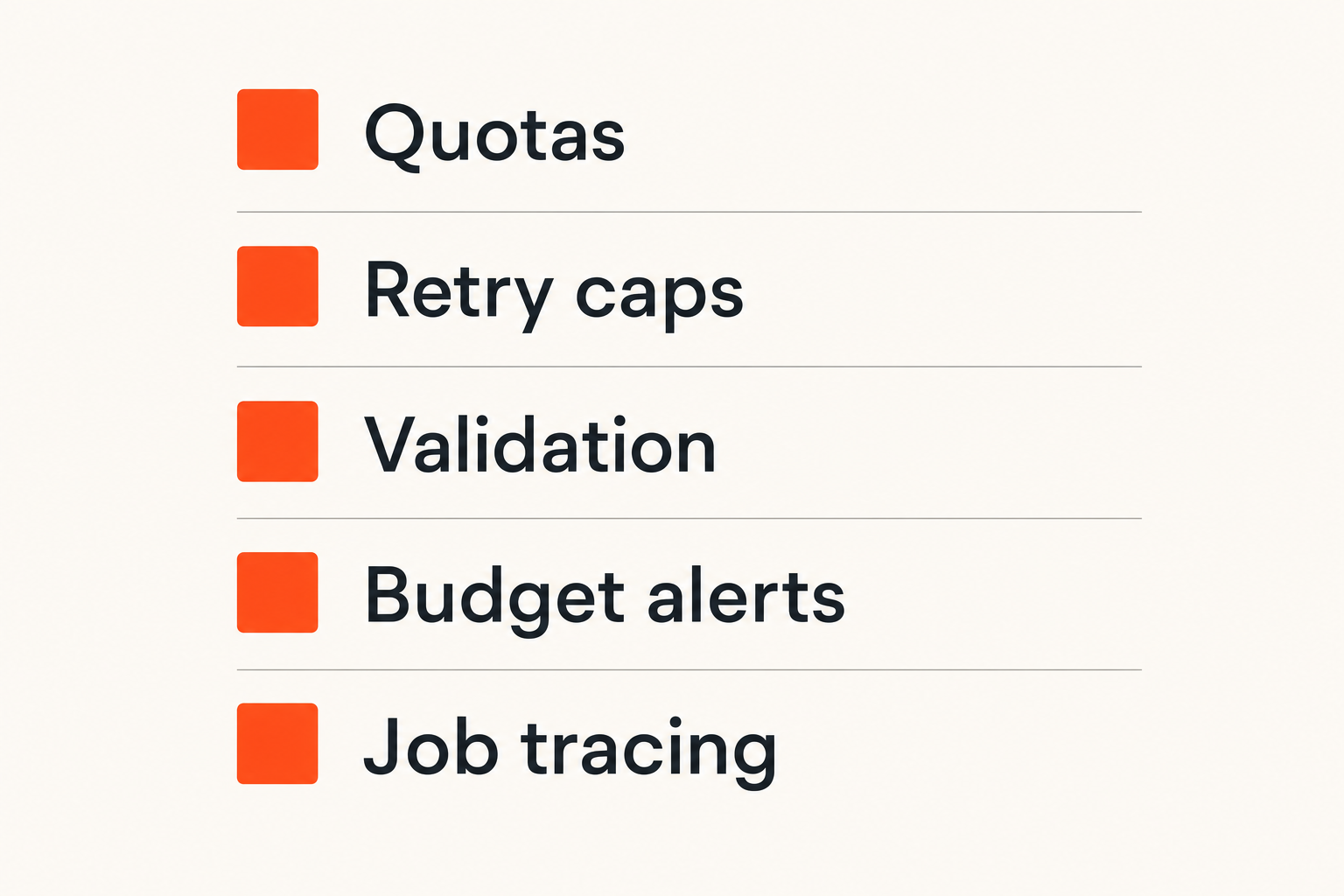
Most GPU bills are not controlled by negotiation. They are controlled by operational defaults.
If any developer can launch large jobs without quota, if retries are unlimited, if logs do not connect cost to job IDs, and if failed outputs are not classified, then the pricing comparison is mostly theater. The system will spend whatever it is allowed to spend.
Quotas budgets and kill switches
Every GPU workflow needs limits.
At minimum:
- max concurrent jobs per user or project
- max GPU-hours per day
- max retry count per job
- max input size
- max output size
- allowed model or codec profiles
- budget alerts tied to job state
- kill switch for runaway queues
These controls are not bureaucracy. They are the difference between experimentation and surprise invoices.
For marketplace compute, quotas also protect trust. A bad job spec can waste provider capacity. A bad worker can waste buyer time. Limits give both sides a boundary.
Observability for cost per output
You need logs that answer operator questions:
- Which job consumed the most runtime?
- Which model has the worst cold start cost?
- Which codec profile fails most often?
- Which worker type produces invalid outputs?
- Which customer or project is driving spend?
- Which retries were useful and which were waste?
The cost dashboard should not be separate from the job dashboard. Cost is a property of execution. If the two are disconnected, engineers debug performance while finance debugs invoices, and nobody has the full trace.
A useful event model includes:
job.created
job.assigned
worker.started
input.downloaded
compute.started
compute.completed
output.validated
payment.settled
job.failed
job.retried
That event stream turns pricing from a monthly surprise into an operational signal.
A practical GPU pricing comparison workflow
A practical GPU pricing comparison workflow starts with the job and ends with a routing policy. It should not end with a vendor logo.
The output should be an architecture decision: which workloads go where, under what constraints, with what validation, and with what budget controls.
The implementation sequence
Use this sequence before committing to a provider or marketplace:
- Define the workload class: batch inference, interactive inference, offline transcode, live video, evaluation, fine-tune, or mixed.
- Define the cost unit: per completed inference batch, per 1,000 tokens, per video hour, per rendition, or per verified job.
- Measure a baseline locally or on one known provider.
- Split time into queue, setup, compute, upload, validation, and retry.
- Identify hard constraints: GPU memory, latency, region, storage path, compliance, and output determinism.
- Test at least two supply models, not just two brands.
- Add failure handling: checkpointing, retries, validation, and cancellation.
- Add budget controls before scaling concurrency.
- Compare cost per completed output, including failed work.
- Write a routing rule that a worker system can actually enforce.
The last step matters. If the comparison cannot become a routing rule, it is not operational yet.
Example routing policy:
if workload = interactive-llm and latency_budget < 2s:
  use reserved regional capacity

if workload = batch-embedding and queue_delay <= 30m:
  use lowest verified worker pool

if workload = offline-transcode and retryable = true:
  use marketplace or interruptible capacity

if workload = live-segment and user_visible = true:
  use controlled hot-path infrastructure
This is the point where pricing becomes architecture.
A comparison table operators can use
Here is a practical template you can adapt:
| Dimension | Question to answer | Why it matters |
|---|---|---|
| Cost unit | What output are we pricing? | Prevents hourly-rate tunnel vision |
| Availability | Can we get the GPU when needed? | Cheap unavailable capacity is not capacity |
| Queue tolerance | How long can jobs wait? | Determines whether flexible supply works |
| Failure model | Can jobs retry safely? | Makes spot and marketplace capacity viable |
| Data path | Where are inputs and outputs? | Data movement can dominate cost |
| Validation | How do we know output is correct? | Required for distributed execution |
| Payment model | When is money released? | Connects compute to settlement |
| Observability | Can we trace cost by job? | Enables debugging and budget control |
| Developer workflow | Can builders submit and inspect jobs easily? | Reduces operator burden |
This table is intentionally not provider-specific. Provider-specific rates change. Architecture questions survive rate changes.
Failure modes where cheap GPUs become expensive
What breaks in practice is rarely the benchmark. It is the missing glue.
Teams run a successful test, scale up, then learn that the happy path was not the system. The real system includes bad inputs, unavailable workers, slow downloads, billing limits, failed outputs, quota errors, and support tickets.
Underpriced reliability
The most common failure mode is underpricing reliability.
A cheap GPU is expensive if it causes manual intervention. A low hourly rate is not useful if a senior engineer spends hours reconciling failed jobs. A marketplace is not efficient if workers cannot be scored, filtered, or removed after bad behavior.
Failure patterns to watch:
- jobs stuck in assigned state
- outputs produced but not validated
- repeated model downloads on every job
- retries that restart from zero
- logs missing job IDs
- payment events detached from execution events
- no way to reproduce a failed run
The fix is not more spreadsheets. The fix is better state design.
A job should have a clear lifecycle. A worker should have health and reputation signals. A payment should reference the job. An output should have validation metadata. Without that, the system cannot tell cheap from broken.
Payment custody and settlement confusion
For web3 developers, payment design is part of compute design.
If a buyer pays before work is validated, they need trust or recourse. If a provider computes before payment is committed, they take counterparty risk. If funds are held somewhere, custody boundaries matter. If identities are unstable, reputation is weak.
This is why DID-based payments and job-level settlement are relevant to GPU pricing. They let compute become a contract: who requested the job, who accepted it, what was produced, how it was validated, and when payment moved.
The practical question is not whether crypto is involved. The practical question is whether settlement state matches execution state.
Practical rule: never let payment state, job state, and validation state become three separate truths.
When those systems disagree, support becomes the reconciliation engine. That is expensive.
Product fit c0mpute.com and decentralized GPU workflows
c0mpute.com is built around a simple idea: compute should be packaged as jobs that can be submitted, routed, executed, validated, and paid for through developer-friendly workflows.
That matters for GPU cloud pricing comparison because decentralized compute only becomes useful when it is operationally legible. Builders need CLI flows, worker health, job metadata, payment state, and examples that map to real AI and media workloads.
When c0mpute.com is a fit
c0mpute.com is a fit when your workload can be expressed as discrete jobs and you want to explore decentralized supply without giving up practical operator controls.
Good candidates include:
- FFmpeg transcode jobs
- batch AI inference
- embedding generation
- model evaluation runs
- media processing backlogs
- web3-native jobs requiring identity and payment context
- experiments where flexible supply matters more than single-provider uniformity
The CLI-first workflow is important. Developers should be able to install tooling, create an identity, submit a job, inspect status, and retrieve outputs without building the entire marketplace stack themselves. The c0mpute docs are the right starting point for install steps, worker concepts, transcode jobs, inference flows, reputation, plugins, and health checks.
The architecture goal is not to replace every GPU cloud use case. It is to make certain job-shaped workloads easier to route across decentralized capacity.
When a hyperscaler is still the right answer
A hyperscaler may still be the right answer when you need tightly coupled multi-GPU training, strict regional compliance, enterprise procurement controls, private networking dependencies, or hard low-latency serving guarantees.
That is not a failure of decentralized compute. It is workload fit.
A serious architecture can use both. Keep control-plane services, hot-path APIs, and stateful user-facing systems on predictable infrastructure. Use decentralized or marketplace compute for retryable jobs where validation is strong and cost flexibility matters.
That hybrid model is usually more realistic than all-or-nothing migration. It also gives teams a cleaner way to benchmark actual cost per completed output across supply models.
Closing the gpu cloud pricing comparison loop
The best GPU cloud pricing comparison in 2026 is not a static list of providers. It is a workflow that turns workload constraints into routing decisions.
That means your comparison should include unit price, but it should not stop there. It should include queue tolerance, data movement, validation, retries, observability, payment state, and developer workflow. The cheaper option is the one that produces correct outputs reliably at the lowest total operating cost.
The decision rule
Use this decision rule:
- If the workload is latency-sensitive and user-facing, pay for predictable capacity.
- If the workload is batchable and retryable, compare flexible supply aggressively.
- If the workload can be validated as a discrete job, decentralized compute becomes a real option.
- If payment and execution must be linked, design settlement into the workflow early.
- If you cannot measure cost per output, do not trust the pricing comparison yet.
The mistake teams make is trying to buy GPUs before they have described the work. Describe the work first. Then choose the supply model.
That is how a GPU cloud pricing comparison becomes an architecture decision instead of a procurement guess.
Try c0mpute.com
c0mpute.com is for technical builders interested in decentralized compute, AI inference, FFmpeg transcoding, and DID-based payments. Try c0mpute.com.