Most compute marketplaces do not fail because nobody can run a job. They fail because nobody can explain what happened after the job ran.
A user submits an AI inference request. A worker claims it. A payment is authorized. A result is returned. Then support asks why the output was slow, the builder asks whether a route is profitable, and the operator asks whether a worker should be trusted again. Suddenly the problem is not compute. It is state.
That is where sigma computing becomes interesting for decentralized compute teams. Not as a spreadsheet with prettier charts. Not as another BI logo in the stack. The practical question is whether your analytics layer can connect jobs, workers, payments, proofs, retries, disputes, and support decisions without forcing every developer to become a data engineer.
Teams think the problem is dashboards. The real problem is operational memory. If your marketplace cannot reconstruct why a job was accepted, priced, retried, settled, or rejected, you do not have an analytics problem. You have an architecture problem.
Table of contents
- Why sigma computing becomes an architecture decision
- Sigma computing in the decentralized compute stack
- Data model: jobs, workers, payments, and trust
- Workflow: from compute event to analytics row
- What works: operational dashboards builders actually use
- What fails: where sigma computing implementations break
- Sigma computing versus custom analytics pipelines
- Implementation sequence for CLI-first teams
- Operating the system in production
- Where c0mpute.com fits
Why sigma computing becomes an architecture decision
The dashboard is not the system
The mistake teams make is treating sigma computing as the last mile of reporting. They wire it to a warehouse, build revenue charts, add a few latency graphs, and call the analytics layer done.
That works until a real operator question arrives:
- Why did this FFmpeg transcode job take four attempts?
- Which worker returned the bad segment?
- Was the inference timeout caused by the model host, queue depth, payment delay, or network routing?
- Did the user get charged once, twice, or not at all?
- Should this worker receive more jobs, fewer jobs, or be suspended?
Those are not generic BI questions. They are workflow questions. A dashboard can show symptoms, but the architecture has to preserve enough context to explain cause.
Practical rule: do not design analytics around charts. Design analytics around the questions an operator must answer during a dispute, incident, or routing decision.
The real unit is a compute state transition
In a decentralized compute marketplace, the real unit of analysis is not a user, server, invoice, or request. It is a state transition.
A job moves from created to quoted, assigned, running, verified, settled, failed, or disputed. A worker moves from available to claimed, busy, penalized, or trusted. A payment moves from authorized to escrowed, released, refunded, or timed_out.
A useful way to think about it is this: sigma computing can be the operator surface, but it should not invent the state machine. The application should emit state transitions. The warehouse should preserve them. The analytics layer should let humans inspect, compare, and act on them.
Why this matters more in 2026
AI inference, video transcoding, and batch compute are becoming more dynamic. Builders are routing workloads across GPUs, CPUs, regional workers, model providers, and private nodes. At the same time, decentralized identity and DID-based payments add trust and settlement state that classic cloud dashboards never had to care about.
That changes the conversation. In 2026, the analytics layer is not just for weekly reporting. It is part of marketplace control. If analytics is stale, incomplete, or disconnected from workflow, your routing and support decisions are based on guesses.
Related reading from our network: teams handling compute-linked checkout face similar state and settlement problems in cloud computing peptide payments architecture, even though the workload domain is different.
Sigma computing in the decentralized compute stack

Where it sits
Sigma computing should sit above your operational data plane and below your human operating cadence.
A typical stack looks like this:
- CLI, API, or SDK accepts a job.
- Scheduler quotes and assigns the job.
- Worker executes AI inference, FFmpeg transcoding, or another compute task.
- Verifier checks output, proof, logs, or checksum.
- Payment layer escrows, releases, refunds, or flags settlement.
- Event stream records transitions.
- Warehouse stores normalized facts and dimensions.
- Sigma exposes analysis, dashboards, and lightweight operational workbooks.
The analytics tool is not the scheduler. It is not the payment rail. It is not the source of truth for worker reputation. It is the inspection and coordination layer that helps operators understand what the system already knows.
If you are mapping a c0mpute-style workflow, the CLI reference and cookbook is the right place to start because it frames jobs, workers, identity, plugins, and health checks as developer primitives rather than abstract reports.
What should not live there
Do not put core marketplace logic inside sigma computing. You will regret it.
Bad examples:
- Calculating authoritative worker reputation only in a workbook.
- Deciding whether to release escrow based on a manual chart filter.
- Maintaining separate hand-edited pricing overrides in analytics.
- Using a dashboard formula as the only definition of job success.
Analytics can propose, inspect, and validate decisions. It should not be the only place those decisions exist. If a rule affects money, trust, routing, or user-visible status, it belongs in versioned application logic or a controlled configuration path.
Practical rule: sigma computing can be an operating surface, but it should not become the hidden backend for payments, reputation, or scheduling.
The operator view
The operator needs fewer charts than most teams think. They need higher-quality joins.
A useful operator view answers four questions quickly:
- What happened to this job?
- Which worker or route touched it?
- What did the user pay or owe?
- What should we do next?
If those answers require five tools, a Slack search, a manual SQL query, and a wallet explorer, your analytics layer is not doing its job.
Data model: jobs, workers, payments, and trust
Start with the job ledger
The job ledger is the backbone. It should contain every meaningful transition, not just the final status.
A narrow event schema is usually enough:
event_id: evt_01
job_id: job_91
job_type: ffmpeg_transcode
actor_type: worker
actor_id: did_worker_7
state_from: assigned
state_to: running
reason_code: worker_started
occurred_at: 2026-06-06T12:04:10Z
trace_id: trace_abcd
attempt: 2
The point is not to capture everything forever in one table. The point is to make reconstruction possible. If a job failed, you need to see whether it failed before assignment, during execution, during verification, or during settlement.
Worker records need context
A worker profile without context creates bad decisions. A node may look slow because it receives the hardest jobs. A region may look unreliable because it handles burst traffic. A GPU may look expensive because it runs the only model that users actually pay for.
Worker analytics should include:
- Capability: CPU, GPU, codec support, model support, memory.
- Geography and network hints.
- Historical success by workload type.
- Retry and timeout behavior.
- Verification failure rate.
- Payment dispute history.
- Reputation inputs and penalties.
What breaks in practice is over-compressing worker quality into one score. Scores are useful for routing, but operators need the ingredients. Otherwise nobody can tell whether a low score means fraud, bad hardware, poor network conditions, overloaded queue, or a mismatch between job type and capability.
Payments are state, not decoration
Compute teams often bolt payments onto analytics as a revenue chart. That is too late in the workflow.
Payments are part of job state. If a job was completed but escrow was not released, the marketplace has an operational issue. If payment was released but verification later failed, the marketplace has a trust issue. If a user was refunded but the worker was still credited, the marketplace has an accounting issue.
For DID-based payments or crypto settlement, capture at least:
- Quote ID.
- Payment intent or escrow ID.
- Wallet or DID references, if safe to store.
- Authorized amount.
- Settled amount.
- Fee amount.
- Refund amount.
- Settlement timestamp.
- Dispute status.
This is where sigma computing can be useful: not to replace the ledger, but to let non-core engineers trace job outcome to payment outcome without writing one-off SQL every time.
Workflow: from compute event to analytics row
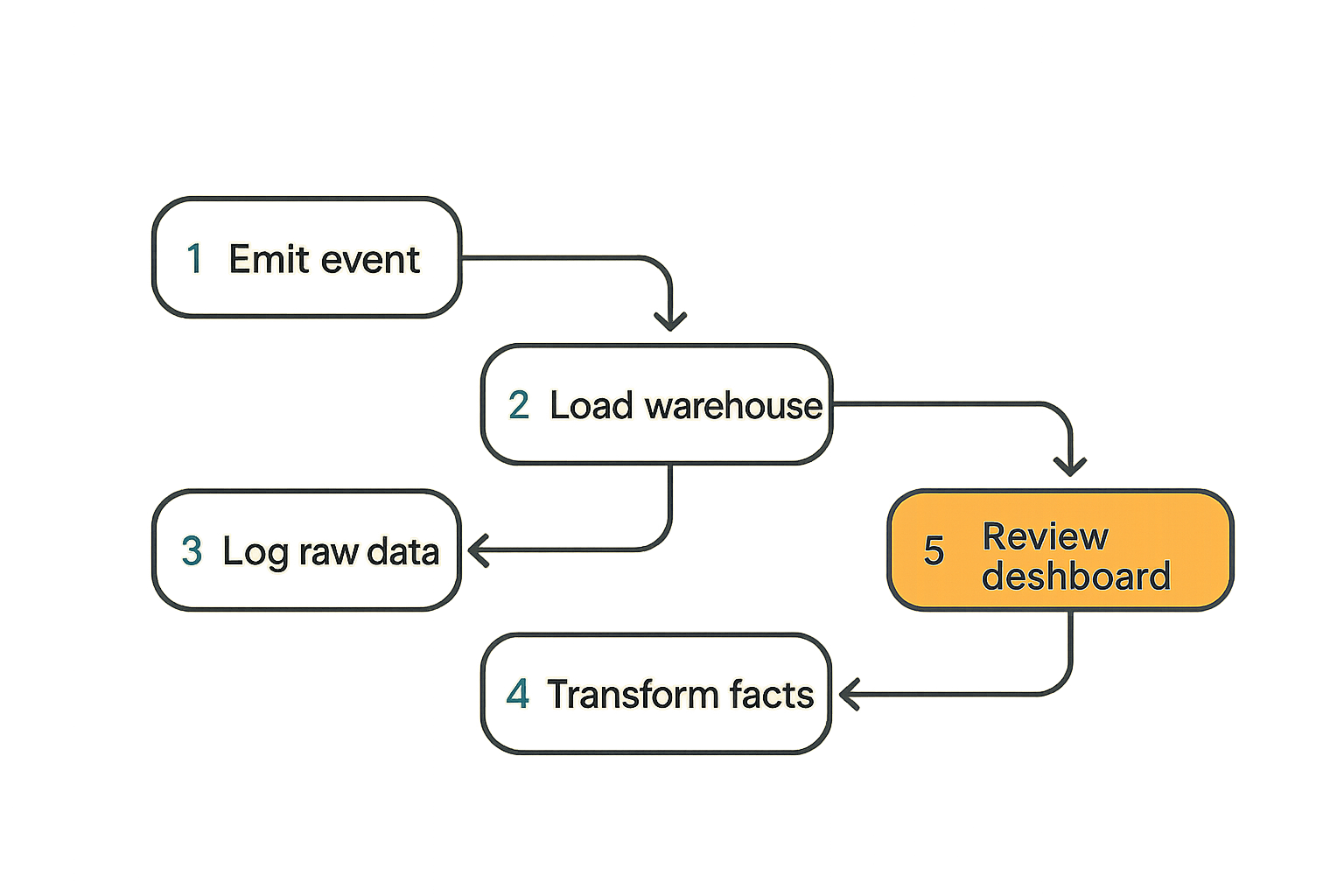
A basic event path
The practical question is how a raw compute event becomes something safe to analyze. A clean workflow looks like this:
- Emit an application event whenever job, worker, verification, or payment state changes.
- Attach stable IDs:
job_id,attempt,worker_id,user_id,payment_id,trace_id. - Write the raw event to an append-only stream or log.
- Load raw events into warehouse storage.
- Transform raw events into facts such as
fact_job_attempts,fact_settlements, andfact_worker_performance. - Expose curated tables to sigma computing.
- Review dashboards in operational rituals, not just ad hoc browsing.
This is boring architecture. That is the point. Boring event paths are easier to debug during incidents.
Related reading from our network: video teams see the same workflow pattern around ingest, transcoding, caching, and observability in cloud computing IPTV architecture, especially when FFmpeg jobs move through multiple asynchronous stages.
Normalize before you visualize
If you connect sigma computing directly to messy raw logs, the tool will look flexible for a week and then become a disagreement machine.
Normalize these concepts before dashboards:
- Job status.
- Failure reason.
- Worker capability.
- Attempt number.
- Queue duration.
- Execution duration.
- Verification duration.
- Payment status.
- Refund reason.
The mistake teams make is allowing every dashboard to define these differently. One workbook counts retries as failures. Another counts only final job status. A third excludes user cancellations. All three may be defensible, but if nobody labels the definitions, operators argue about metrics instead of fixing the system.
Practical rule: every operational metric needs a definition, an owner, and a known source table. If it affects payment or trust, version it.
Keep raw events available
Curated tables are for speed. Raw events are for truth recovery.
When something weird happens, the aggregate is rarely enough. You need the original event order, timestamps, actor IDs, payload version, and trace IDs. This matters when a worker claims it never received a job, when a user disputes a charge, or when a verification plugin starts rejecting valid outputs after an upgrade.
A good pattern is:
- Store immutable raw events.
- Build curated warehouse models for daily use.
- Keep transformations reproducible.
- Link dashboard rows back to trace IDs or job IDs.
Sigma computing should make the common path easy. It should not destroy the forensic path.
What works: operational dashboards builders actually use
The routing dashboard
The routing dashboard tells you where to send the next job. Not in real time like a scheduler, but operationally: which routes are healthy, profitable, and trustworthy.
Useful fields:
- Job type.
- Region.
- Worker class.
- Median queue time.
- Median execution time.
- Verification failure rate.
- Retry rate.
- Cost per completed job.
- Revenue or fee per completed job.
- Dispute rate.
A routing dashboard should not simply rank workers by speed. Speed without output quality is noise. Low cost without settlement reliability is risk. High availability without verification success is a support burden.
The settlement dashboard
The settlement dashboard connects money to job state. It should show where funds are stuck and why.
Useful slices:
- Completed jobs awaiting release.
- Failed jobs with open escrow.
- Refunded jobs with worker credit.
- Disputed jobs by reason.
- Settlement lag by payment rail.
- Fee leakage by route.
For decentralized compute, this dashboard matters because the payment boundary is often more complex than in a centralized SaaS product. A user may pay through a wallet, a DID-linked identity, a prepaid balance, or an escrow-like flow. Operators need to see settlement state beside compute state.
The support dashboard
Support tooling is where many analytics stacks prove whether they are useful.
A good support view starts with a job ID, user DID, wallet reference, or trace ID and returns a timeline:
- Quote issued.
- Payment authorized.
- Worker assigned.
- Attempt started.
- Attempt failed or succeeded.
- Output verified.
- Payment released or refunded.
- Notification sent.
This is not glamorous, but it shortens investigation time. It also reduces the number of engineers pulled into routine support questions.
Related reading from our network: teams building discoverable cloud content face a different surface area, but the same need for validation loops and machine-readable structure appears in cloud computing answer engine optimization.
What fails: where sigma computing implementations break
Failure mode 1: metrics without ownership
A metric without an owner becomes folklore.
If job_success_rate drops, who investigates? Scheduler? Worker ops? Verification? Payments? Support? If nobody owns the metric, the dashboard becomes a weather report. Interesting, possibly accurate, and operationally weak.
Assign owners to operational metrics:
- Scheduler owns assignment latency and queue depth.
- Worker ops owns execution success by capability.
- Verification owns false rejects and output validation failures.
- Payments owns settlement lag and refund mismatch.
- Support owns dispute aging and customer-visible unresolved jobs.
Ownership does not mean blame. It means somebody knows where to look first.
Failure mode 2: ignoring retries
Retries are where truth goes to die.
A job that succeeds after four attempts is not the same as a job that succeeds on the first attempt. A worker that fails once on a hard model is not the same as a worker that repeatedly times out on simple jobs. A payment that succeeds after a webhook retry is not the same as a payment that never reconciles.
If your sigma computing model only stores final status, it will overstate reliability and hide cost. You need attempt-level facts.
Minimum useful attempt fields:
- Attempt number.
- Assigned worker.
- Start and end timestamps.
- Failure reason.
- Output hash or artifact reference.
- Verification result.
- Retry trigger.
The final job row is a summary. The attempt row explains the cost of getting there.
Failure mode 3: mixing billing and analytics truth
Analytics truth and billing truth overlap, but they are not always identical.
Billing systems need conservative, auditable rules. Analytics systems need flexible slicing. Problems start when a dashboard formula becomes the unofficial billing definition, or when finance exports a workbook and treats it as the settlement ledger.
Keep boundaries clear:
- Ledger records authoritative financial events.
- Application records job and worker state.
- Warehouse joins and models events for analysis.
- Sigma computing exposes controlled views for humans.
If the numbers disagree, the workflow should explain why. Maybe a refund is pending. Maybe a late webhook has not landed. Maybe a transformation excluded test jobs. The answer should be traceable, not political.
Sigma computing versus custom analytics pipelines
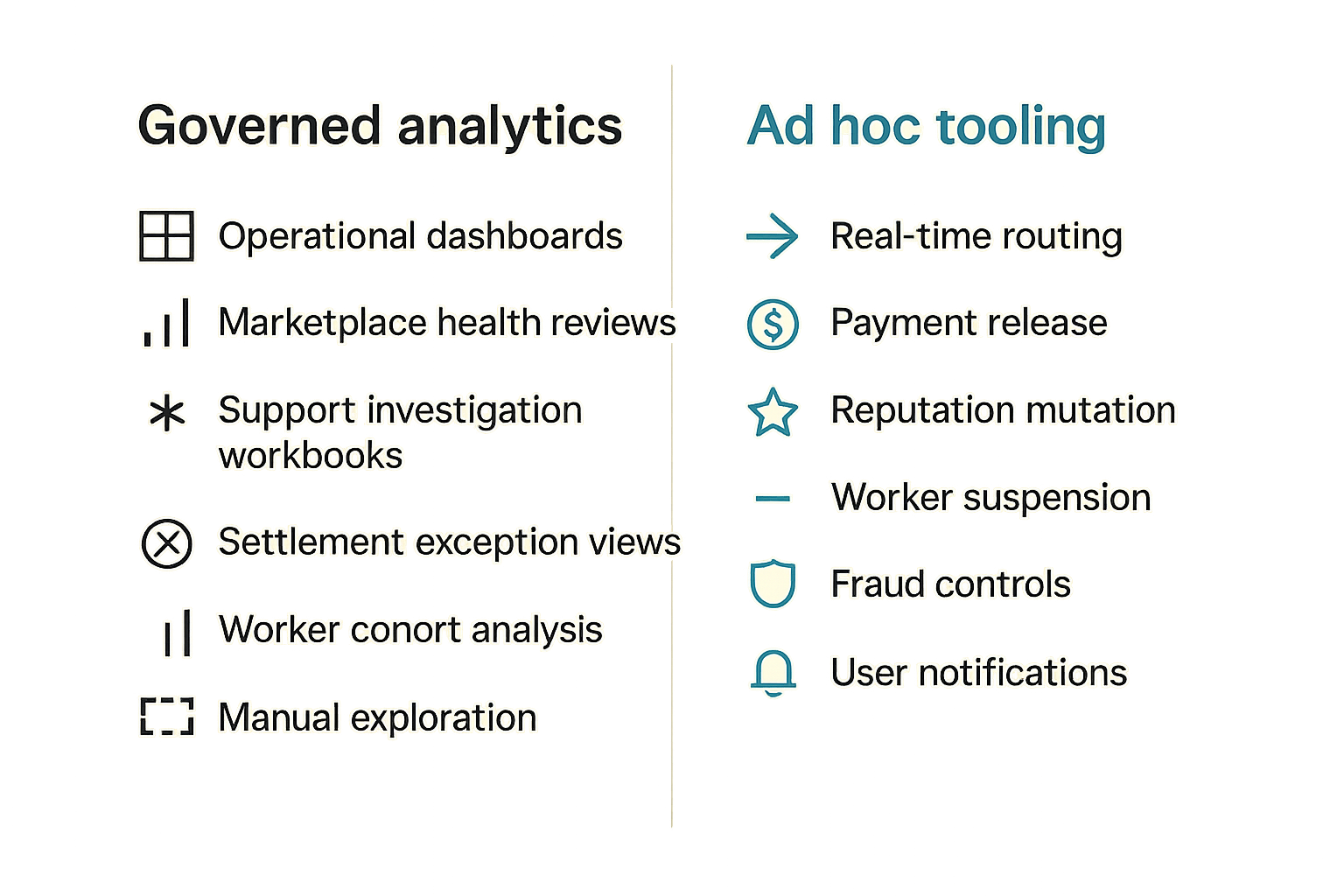
When sigma computing is enough
Sigma computing is a good fit when builders need interactive analysis on top of governed warehouse data. It helps when operators are comfortable with spreadsheet-like workflows but the underlying data is too large or too relational for actual spreadsheets.
It is often enough for:
- Operational dashboards.
- Marketplace health reviews.
- Support investigation workbooks.
- Settlement exception views.
- Worker cohort analysis.
- Manual exploration before automating a routing rule.
The key is to keep it connected to curated models. If the data model is clean, sigma computing can let more people inspect the system without creating a backlog of custom internal tools.
When you still need code
You still need code for anything that changes production state automatically.
Use application code, jobs, or controlled services for:
- Real-time routing.
- Payment release.
- Reputation mutation.
- Worker suspension.
- Fraud controls.
- User notifications.
- SLA enforcement.
Sigma can inform these systems. It can help you prototype thresholds. It can expose exceptions. But automated production actions should live in tested, reviewed, observable services.
Comparison table
| Approach | What works | What fails | Best use |
|---|---|---|---|
| Sigma computing over curated warehouse tables | Fast operator analysis, fewer SQL requests, flexible workbooks | Breaks if source definitions are messy | Dashboards, support views, settlement exceptions |
| Custom internal admin app | Strong workflow control, permissions, actions | Expensive to build for every question | Actions that mutate production state |
| Raw SQL and notebooks | Maximum flexibility for engineers | Not accessible to operators, hard to govern | Deep investigation and data science |
| Spreadsheet exports | Quick one-off sharing | Stale data, copy errors, no lineage | Temporary offline review only |
The practical answer is not one tool. It is a boundary. Let sigma computing handle governed inspection. Let code handle state changes.
Implementation sequence for CLI-first teams
Step 1: define canonical events
Start by writing down the events your CLI, API, scheduler, workers, verifiers, and payment layer must emit.
A minimal set:
job.createdjob.quotedpayment.authorizedjob.assignedattempt.startedattempt.completedattempt.failedverification.completedpayment.releasedpayment.refundedjob.disputed
Do not begin with dashboards. Begin with events. If the event stream is wrong, every dashboard is just a nicer view of bad memory.
Step 2: ship a narrow warehouse model
Build a small number of tables first:
fact_jobsfact_job_attemptsfact_paymentsfact_worker_dailydim_workersdim_job_typesdim_users_or_identities
Avoid the temptation to model everything. The first goal is answering core operating questions, not creating a perfect semantic universe.
A simple transformation rule might look like this:
metric: completed_job
source: fact_jobs
true_when:
  - final_state = verified
  - payment_state in [released, prepaid]
exclude:
  - test_job = true
  - cancelled_by_user = true
owner: marketplace_ops
version: 2026-06-01
This kind of definition is not exciting, but it prevents expensive ambiguity later.
Step 3: wire dashboards to operating reviews
A dashboard nobody reviews is shelfware.
Tie each workbook to a cadence:
- Daily: failed jobs, stuck payments, worker health.
- Weekly: route profitability, retry cost, dispute aging.
- Monthly: worker cohorts, model demand, codec demand, regional capacity.
The review should produce actions. Suspend a bad worker. Increase capacity for a model. Adjust timeout settings. Improve verification. Fix a payment webhook. If the dashboard never changes the system, either the dashboard is wrong or the meeting is.
Operating the system in production
Latency, freshness, and incident review
Not every metric needs real-time freshness. But every metric needs an expectation.
For example:
- Incident dashboards may need 1 to 5 minute freshness.
- Settlement exception views may be fine at 15 minutes.
- Weekly route profitability can run hourly or daily.
- Monthly capacity planning does not need streaming updates.
Define freshness by use case. Real-time everything is expensive and often unnecessary. Stale incident views, however, are dangerous.
During incidents, link analytics to system health. If operators are investigating whether delayed worker heartbeats are affecting assignment, they should also check the live network status rather than relying only on warehouse data that may lag behind production.
Access control and sensitive metadata
Compute analytics can expose sensitive information: wallet references, DIDs, user prompts, video filenames, model names, IP hints, artifact hashes, and payment details.
Do not give every operator every field.
Practical controls:
- Mask wallet and identity references where possible.
- Separate prompt or media metadata from operational timing data.
- Restrict payment details to finance and trusted support roles.
- Keep raw payload access narrower than dashboard access.
- Log access to sensitive workbooks.
The goal is not to make analysis painful. The goal is to avoid turning your BI layer into the easiest place to leak user or worker data.
Validation beats beautiful charts
The most important sigma computing dashboard is the one that tells you when sigma computing is wrong.
Create validation checks:
- Count raw events versus transformed rows.
- Compare ledger settlement totals to warehouse payment facts.
- Compare scheduler assignments to worker attempt records.
- Track events missing stable IDs.
- Alert on unknown state transitions.
- Flag dashboards using deprecated fields.
What breaks in practice is silent drift. A new worker version emits attempt.timeout instead of attempt.failed. A payment service changes a status name. A verifier adds a new result code. Nothing crashes, but the dashboard slowly lies.
Practical rule: treat analytics transformations like production code. Version them, test them, and monitor them for drift.
Where c0mpute.com fits
Use analytics to close the compute loop
For decentralized compute builders, sigma computing is most useful when it closes the loop between demand, execution, verification, settlement, and future routing.
The loop looks like this:
- Users submit jobs through CLI, API, or product flows.
- Workers execute transcode, inference, or plugin workloads.
- Verifiers and payment rails record outcomes.
- Analytics exposes bottlenecks, costs, and trust signals.
- Operators adjust routing, worker policy, pricing, and support workflows.
- The next job benefits from the previous job's evidence.
That is the architecture worth building. Not a dashboard layer for executives. A memory layer for the marketplace.
A practical fit for builders
c0mpute.com is aimed at technical builders working with decentralized compute, AI inference, FFmpeg transcoding, and DID-based payments. That means analytics has to respect developer workflows: CLI-first execution, inspectable state, worker health, payment boundaries, and operational traceability.
Sigma computing can fit into that architecture if you keep the boundaries clean. Let the compute network emit events. Let the warehouse normalize them. Let sigma help humans inspect and coordinate. Let production services own routing, settlement, and reputation changes.
The closing point is simple: sigma computing is not the source of truth for decentralized compute. It is the place where the truth becomes usable by operators.
Try c0mpute.com
c0mpute.com is for technical builders interested in decentralized compute, AI inference, FFmpeg transcoding, and DID-based payments. Try c0mpute.com if you are building compute workflows that need clear job state, worker coordination, and practical settlement boundaries.